Criminal Case: Pacific Bay
- 4.7
- Rating
- 10.00M
- Installs
- Free
- Price

 Analysis by App-foxy
I spent time with Criminal Case: Pacific Bay as a mobile adventure game built around investigating scenes, finding objects, and connecting clues. Its strongest appeal is easy to understand: each case gives me a compact mystery to work through, and the hidden-object format makes it possible to play in short sessions rather than requiring a long uninterrupted campaign. The Pacific Bay setting gives the investigation a recognizable identity, while the work from Pretty Simple keeps the presentation focused on the familiar rhythm of searching, collecting evidence, and moving the story forward.
That format also makes the game interesting from an access perspective. A player does not need fast reflexes or complicated controls to begin, but visual attention, reading comfort, patience, and tolerance for repeated searches matter a great deal. I found it welcoming in some situations and surprisingly demanding in others. It is free to start, aimed at a Teen audience, and has reached over 10 million installs with a 4.7 average from around 251 thousand ratings. Those figures suggest a broad audience, but they do not remove the need to consider how the game fits a particular player’s abilities, device, and surroundings.
How clearly the investigation supports different players
I look at how the game’s straightforward investigation loop can suit players with different needs, while also distinguishing simple controls from the sustained visual attention its scenes demand. That distinction helps explain why the same case can feel inviting to one person and tiring to another.
You May Also Like

 Pandora - Music & Podcasts
Pandora’s Music Is Easy to Start, but Harder to Recover
Pandora’s strength is its low-effort path from a seed to a station. Its weak spot is how much confidence it asks you to place in connection, setup, and quiet recovery.

 AccuWeather: Weather Radar
AccuWeather Review: A Quick, Clear Forecast for Everyday Decisions
For everyday plans, the best forecast is the one you can understand quickly. AccuWeather makes rain timing, radar, and local conditions easy to act on, with a few trade-offs.

 Hill Climb Racing
Why Hill Climb Racing Still Turns Crashes Into One More Run
A tiny car, a bumpy hill and one more upgrade: Hill Climb Racing keeps resurfacing because its simple chaos makes every near-miss feel personal.

 AliExpress - Shopping App
AliExpress Makes Global Shopping Feel Personal, but Shoppers Bear the Risk
AliExpress turns a global marketplace into a pocket-sized discovery engine. Its reach is useful, its shopping loop compelling, and its trade-offs easy to miss.

 Lords Mobile: Kingdom Wars
Lords Mobile Is a Kingdom-Building Routine, Not a Quick Match
A case-by-case verdict on the building, battles, device demands, and social commitments that make Lords Mobile rewarding for some players and exhausting for others.

 PDF Scanner app - TapScanner
TapScanner Makes Paperwork Easier to Capture, Check, and Share
TapScanner makes scanning with a phone feel less like a rescue operation and more like a dependable step in getting work done. Its capture tools are useful, though not flawless.
More From Our News Desk
View All News


Readability and navigation during a case
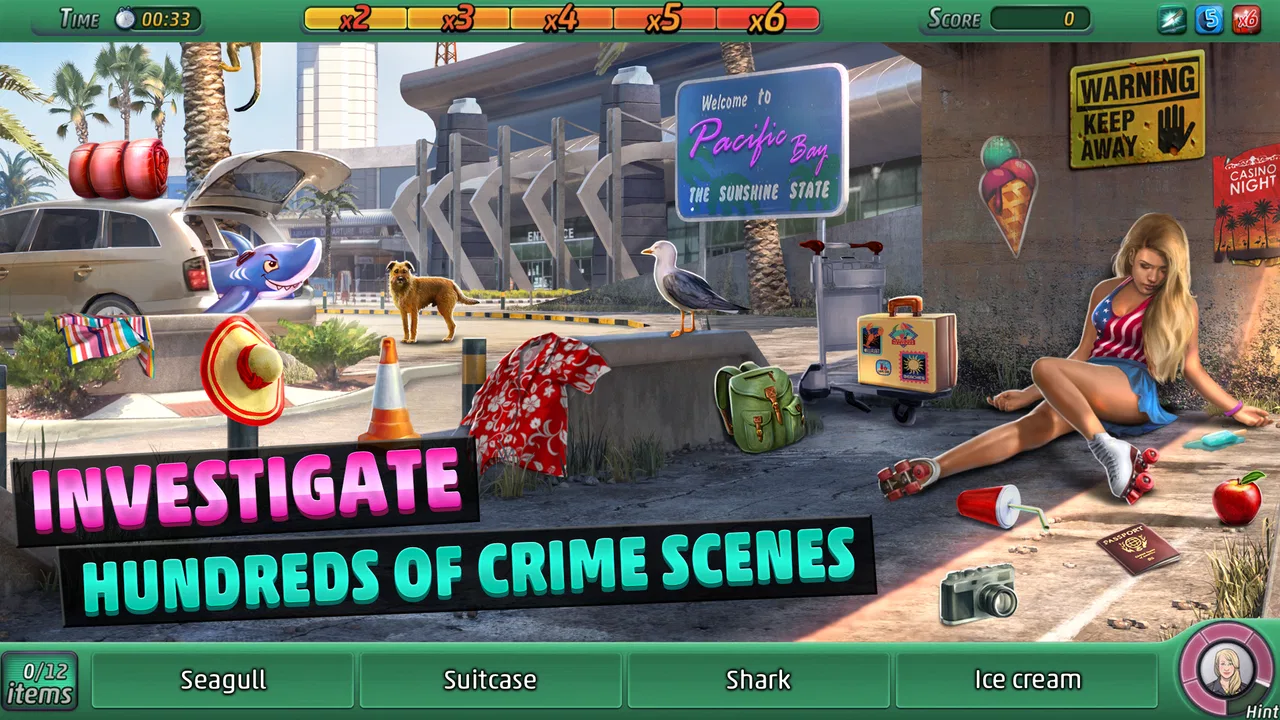
The basic flow is easy to grasp. I move through an investigation, enter a scene, search for listed objects, and use what I find to continue the case. This clear loop is one of the game’s most accessible qualities because it reduces the number of actions I need to remember. I am not juggling a large control scheme or learning a complicated movement system. The main challenge is understanding what the scene is asking me to notice.
Navigation feels more manageable when I treat every scene as a visual checklist rather than tapping randomly. I first scan the whole image, then work from one side to the other in a slow pattern. This avoids repeatedly crossing the same area and is especially helpful when the object list includes small or visually similar items. It also makes the experience less tiring for players who find unstructured visual searching frustrating.
The interface is generally approachable for someone comfortable reading short instructions and examining a busy picture. However, hidden-object games naturally place a lot of information on one screen. Background details, characters, evidence markers, and the object list can compete for attention. On a smaller phone, I found that the search itself demanded more concentration than the story sections. A larger display can make the same scene feel calmer, even though the underlying game has not changed.
One useful habit is to pause mentally before tapping. The game rewards recognition more than speed in ordinary play, so I get better results by checking the shape, color, and context of a possible object first. This matters for players with attention differences: the scene becomes a series of small decisions instead of one overwhelming image. It also reduces accidental taps, which can make a search feel more controlled.
The narrative structure provides helpful signposting. Cases give me a reason to visit the next location or inspect the next piece of evidence, so I am rarely left wondering what the overall objective is. Still, the game expects me to follow written story beats. Anyone who struggles with small text, dense dialogue, or rapid movement between story and search screens may find the presentation less comfortable than the simple controls initially suggest.
Motor and sensory considerations
From a motor standpoint, the game is less demanding than an action adventure. I do not need to steer a character through hazards, perform timed jumps, or combine several buttons. Most interaction comes down to tapping objects and selecting options. That makes it a reasonable choice for players who prefer low-pressure touch gameplay or who find fast, coordinated input difficult.
There is an important qualification: low motor demand does not mean no motor demand. Searching a crowded scene can involve many individual taps, and a player with limited precision may occasionally touch the wrong item. I found that using the pad of my finger rather than the fingertip made the screen feel more forgiving, while holding the phone steady with both hands reduced unnecessary movement. A stylus could also be useful for someone who prefers more precise pointing, although the game does not require one.
The visual side is more demanding than the control side. The main skill is distinguishing objects from their surroundings, sometimes when they blend into a detailed background. Players with reduced vision, color-vision differences, or sensitivity to visual clutter may need to adjust their expectations. The game’s central mechanic depends on noticing visual details, so this is not a minor optional element that can simply be ignored.
I also recommend playing in a comfortable lighting environment. Glare on a phone screen can hide edges and colors, while a very dim room can make a long search more tiring. Increasing the phone’s text size or display scaling may help with surrounding interface text, but it will not necessarily enlarge every object inside a scene. That distinction is important: device-level adjustments can improve general reading without fully solving the core visual challenge.
Sound is not the main way I solved cases. The game works primarily through what I see and read, which means a player who does not rely on audio can still understand the central investigation loop. At the same time, players who are sensitive to repeated effects or background sounds may prefer to manage the phone’s volume or play in a quieter setting. I would not choose this game for someone seeking a sensory-minimal experience, because the visual density alone can be stimulating even when the controls are simple.
Playing in everyday situations
This is where the format works particularly well. I could imagine playing a scene while waiting for an appointment, during a commute when it is safe to use a phone, or in a few quiet minutes before bed. A single search does not require the same commitment as a full console adventure. If I had to stop, the game’s case-based structure made it easy to return to the investigation without needing to remember a complicated route or combat strategy.
That convenience has limits. Hidden-object searches require attention, so I would not play while walking, crossing a street, supervising a child, or doing anything that needs immediate awareness. The game may be suitable for a waiting room, but only if the player can comfortably focus on the screen. It is also less appropriate for a noisy environment if reading dialogue or concentrating on small details is already difficult.
For a player who gets tired quickly, I suggest treating a scene as a complete mini-session rather than pushing through several cases. The search mechanic can become less enjoyable when fatigue sets in, because similar shapes start to blur together and the temptation to tap everywhere increases. Shorter sessions preserve the satisfying “spot and confirm” feeling that makes the game work in the first place.
The free entry point lowers the barrier to trying it, but the wider progression can involve in-app purchases ranging from $0.99 to $99.99 per item. I would advise setting a purchase limit before handing the phone to a child or to anyone who may tap through prompts without considering the cost. The Teen content rating is another reason I would not treat it as a preschool game, even though the touch controls are uncomplicated.
Small workflows that make searching easier
My most effective approach was to divide each scene into zones. I checked the upper area, then the center, then the lower area, moving from left to right inside each zone. This is more reliable than searching by object type because the list can contain unrelated items. It also gives the eyes a repeatable path, which can help players who lose their place in visually busy images.
A second useful technique is to delay the hardest item instead of letting it dominate the whole search. If I could not identify something after two careful passes, I moved on and returned later. Other objects disappearing from the scene reduced the clutter and sometimes made the remaining item easier to recognize. This is a simple but meaningful trade-off: patience usually works better than frantic tapping.
I also found value in reading the object names literally before interpreting them creatively. A player may expect a clue to be symbolically important, but the search task often depends on recognizing an ordinary item hidden in an unusual position. Looking for the everyday meaning first prevents the story from sending my imagination in the wrong direction.
Finally, I kept the phone at a steady distance instead of repeatedly bringing it close to my face. That made the whole scene easier to compare and reduced the feeling of chasing individual pixels. If text was the immediate problem, I adjusted the device display before starting another case. If the objects themselves remained too difficult to distinguish, I treated that as a genuine limitation of the format rather than assuming I simply needed to play faster.
Where the inclusive experience still falls short
The biggest barrier is inseparable from the game’s identity: the hidden-object scenes ask the player to locate visual details in crowded compositions. There is no substitute for that skill within the main loop. Someone with significant visual impairment may find the game inaccessible even if the menus and tapping are straightforward. The same is true for a player who becomes overwhelmed by dense images or who cannot comfortably maintain visual focus for several minutes.
Text can create a separate obstacle. The investigation is not only a picture search; it also uses story and case instructions to give the activity meaning. Players who have difficulty reading on a phone, process text slowly, or need more time between screens may prefer to play without pressure and in a setting where they can stop and reread. I found that the game is more comfortable when I resist rushing through the narrative just to reach the next scene.
Motor accessibility is better than visual accessibility, but repeated tapping and small targets may still frustrate some players. A touchscreen does not provide the physical feedback of a controller, so it can be harder to know whether a tap landed exactly where intended. The game is therefore a better match for someone who can make reasonably accurate screen touches than for someone who needs large, widely spaced controls.
There is also a cognitive trade-off. The structure is predictable, which can be reassuring, but the search scenes ask me to sustain attention and remember what I have already checked. Players who prefer direct exploration, constant movement, or rapid changes in challenge may experience the repeated investigation pattern as slow. In that situation, a more action-oriented adventure game would probably be a better choice.
Another consideration is spending pressure. The game costs nothing to begin, but optional purchases can change how comfortable the long-term experience feels for different players. Someone who wants a completely uninterrupted, no-spend puzzle routine may prefer a paid game with a fixed price. Someone who enjoys sampling a game first and deciding later may appreciate the free starting point, provided purchase controls are handled carefully.
How it compares with other adventure choices
Compared with action adventures, this game is calmer and much more dependent on observation than reaction. That makes it a good alternative for me when I want a mystery without combat or demanding movement. Compared with traditional point-and-click adventures, it places more emphasis on locating objects in prepared scenes and less on experimenting with a large inventory or combining many items. The result is easier to start, but it offers less freedom for players who enjoy solving puzzles in several possible ways.
It also differs from short, minimalist puzzle games. Those games may present cleaner screens and a single abstract challenge, while Pacific Bay wraps its searches in an ongoing criminal investigation. I found the story useful as motivation: finding an object felt connected to a case rather than being an isolated visual exercise. The trade-off is that players who want pure puzzles may consider the dialogue and progression interruptions.
For families, I would describe it as a Teen-rated mystery game rather than a universal children’s title. An adult can enjoy helping a younger player search a scene, but the tone and investigation framing should be considered before sharing it. For older players or anyone who likes familiar detective television rhythms, the case format may feel inviting. For someone who wants a quiet, highly adjustable accessibility experience, I would look for a title that offers stronger control over text size, contrast, and visual complexity.
Who should try it and who should skip it
I would recommend it to players who enjoy spotting details, reading light investigative stories, and progressing through cases in manageable bursts. It is especially suitable for someone who prefers tapping and observation to reflex-heavy play. The free starting point makes experimentation easy, and the large player base suggests that the formula has broad appeal. The current version is 2.45.1, and the game supports devices running Android 7.0 or later, which is useful to check before downloading.
I would be more cautious about recommending it to anyone with substantial difficulty distinguishing small visual elements. I would also steer away from it for players who dislike repeated searches, want a fully offline-feeling experience with no purchase considerations, or expect every puzzle to have a single clever logical solution. The game’s pleasure comes from careful visual scanning, not from deep deduction at every step.
My overall view is positive but specific. Criminal Case: Pacific Bay is most inclusive when “accessible” means simple touch controls and flexible short-session play; it is less inclusive when the player needs low visual clutter, large search targets, or extensive presentation adjustments. I enjoyed its approachable investigation rhythm, and I think the Pacific Bay setting gives the familiar hidden-object formula enough personality to keep it moving. I would start with a comfortable screen, good lighting, and a spending limit, then judge the first few scenes by how tiring the visual search feels rather than by how quickly I can finish them.
Pretty Simple has made an adventure game that is easy to enter without being easy for every pair of eyes. That distinction is worth keeping in mind. If the player enjoys methodical searching and can comfortably read and inspect a phone screen, the game can become a pleasant companion for short breaks. If visual detail is the main barrier, or if the repeated scene structure sounds tedious, another adventure style will likely provide a better and more genuinely enjoyable fit.
FAQs for Criminal Case: Pacific Bay
01What is Criminal Case: Pacific Bay?
Criminal Case: Pacific Bay is a hidden-object adventure game in which you investigate crimes in a tropical setting. You examine crime scenes, search for clues, question suspects, analyze evidence, and eventually identify the culprit. The game combines detective storytelling with casual puzzle mechanics, making it accessible even if you have never played the original Criminal Case series.
02Is Criminal Case: Pacific Bay free to download and play?
Yes, Criminal Case: Pacific Bay can generally be downloaded for free on supported Android and iOS devices. However, the game includes optional in-app purchases, such as premium currency or items that can speed up progress. You can play without spending money, but energy limits, waiting periods, and repeated attempts at scenes may make the experience slower for free players.
03Does the game require an internet connection?
An internet connection is usually required for important features, including loading investigations, synchronizing progress, displaying advertisements, and processing in-app purchases. Some portions may remain accessible temporarily after they have loaded, but offline play is not guaranteed. For the most reliable experience, launch the game while connected to Wi-Fi or mobile data.
04Is Criminal Case: Pacific Bay suitable for children?
The game is presented in a cartoon-style format, but its stories involve murders, crime scenes, investigations, and references to violence. Because of these themes, it may not be appropriate for young children, even though the gameplay is simple and colorful. Parents should check the age rating in their region and review the game’s content before allowing children to play.
05What devices are compatible with Criminal Case: Pacific Bay?
Compatibility depends on the operating system version, available storage, and the specific device model. The game is designed for Android and iOS smartphones and tablets, but older devices may experience slower loading, crashes, or limited support. Before downloading, check the current Google Play Store or App Store listing to confirm the required system version and available space.
Pros
- Engaging hidden-object investigations with varied crime scenes.
- Episodic cases provide a clear sense of progression.
- Bright
- comic-book visuals make clues easy to recognize.
- Character upgrades add strategy beyond simple clue searching.
- Works well for short play sessions on mobile devices.
Cons
- Energy limits can interrupt investigations at inconvenient moments.
- Some upgrades and clues require patience or premium currency.
- Repeated searches may feel predictable after extended play.
- Dialogue and story choices offer limited impact on outcomes.
- Ads and timed rewards can make progress feel slower.

Criminal Case: Pacific Bay
Gallery